<?xml version="1.0" encoding="utf-8"?>
<feed xmlns="http://www.w3.org/2005/Atom">
  <title>Vue.js</title>
  
  
  <link href="/atom.xml" rel="self"/>
  
  <link href="http://vuejs.org/"/>
  <updated>2020-09-20T15:47:21.590Z</updated>
  <id>http://vuejs.org/</id>
  
  <author>
    <name>Evan You</name>
    
  </author>
  
  <generator uri="http://hexo.io/">Hexo</generator>
  
  <entry>
    <title>vue-resource の引退について</title>
    <link href="http://vuejs.org/2016/11/03/retiring-vue-resource/"/>
    <id>http://vuejs.org/2016/11/03/retiring-vue-resource/</id>
    <published>2016-11-03T14:27:00.000Z</published>
    <updated>2020-09-20T15:47:21.590Z</updated>
    
    <content type="html"><![CDATA[<p>このブログは<a href="https://medium.com/the-vue-point/retiring-vue-resource-871a82880af4#.33jmtzpgb" target="_blank" rel="noopener">こちら</a>の翻訳ブログです。</p><p>Vue のユーザーとして、皆さんの多くが使用している可能性がある <a href="https://github.com/vuejs/vue-resource" target="_blank" rel="noopener"><em>vue-resource</em></a> は Vue アプリケーションでの ajax リクエストを処理するためのものです。<br>長い間それは Vue 用の「公式」ajax ライブラリとして考えられてきましたが、本日私たちはそれを公式推奨という状態から引退させました。</p><p>vuejs organization のもとに列挙されているものの、<em>vue-resource</em> はほぼ完全に <a href="https://github.com/pagekit" target="_blank" rel="noopener">PageKit チーム</a>によって書かれ、保守されてきました。<br>私たちが初期の頃 vuejs organization にそれを移したのは、コミュニティが本質的な問題を解決するためのライブラリを寄付することは良いことだと思ったからであり、また私たちは PageKit チームがプロジェクトに投下したすべての作業に大いに感謝しています。<br>しかし、時が経つにつれ私たちは Vue 用の「公式 ajax ライブラリ」は実は必要ではないとの結論に至りました。なぜなら：</p><ol><li>ルーティングや 状態管理とは異なり、ajax は Vue のコアとの緊密な統合を必要とする問題領域ではありません。<br>ほとんどの場合純粋な 3rd パーティのソリューションが同様にうまく問題を解決できます。</li><li>同じ問題を解決するための優れた 3rd パーティの ajax ライブラリがあり、より積極的に改良/保守されていて、かつuniversal/isomorphic（Node とブラウザの両方で動作し、そのことはサーバーサイドレンダリング用途での Vue 2.0 にとって重要）になるよう設計されています。</li><li>(1) と (2) であるので、vue-resource の現状を維持することは二度手間かつ不要なメンテナンスの負担をもたらしていることが明らかです。<br>私たちが vue-resource の問題の解決に費やしていた時間を他のスタック（訳注：課題リスト）の改善により費やすことが可能となります。</li></ol><h2 id="Q-amp-A"><a href="#Q-amp-A" class="headerlink" title="Q&amp;A"></a>Q&amp;A</h2><h3 id="これは-vue-resource-の廃止を意味していますか？"><a href="#これは-vue-resource-の廃止を意味していますか？" class="headerlink" title="これは vue-resource の廃止を意味していますか？"></a>これは vue-resource の廃止を意味していますか？</h3><p>いいえ。もはや「公式推奨」の一部ではないということだけです。<br>リポジトリは pagekit/vue-resource に戻され、開発は継続されるでしょう。<br>このライブラリの長期計画を決定するのは PageKit チームの役目です。</p><h3 id="私は使用を中止する必要がありますか？"><a href="#私は使用を中止する必要がありますか？" class="headerlink" title="私は使用を中止する必要がありますか？"></a>私は使用を中止する必要がありますか？</h3><p>あなたがそれに満足している場合、使い続けることは全くもって結構です。<br>移行する可能性のある理由としては、保守、universal/isomorphic サポートと、より高度な機能（訳注：が欲しい場合）が含まれます。</p><h3 id="私は次に何を使うべきですか？"><a href="#私は次に何を使うべきですか？" class="headerlink" title="私は次に何を使うべきですか？"></a>私は次に何を使うべきですか？</h3><p>何を好んで選択するかはあなたの自由（単に（訳注：jQuery の）<code>$.ajax</code> でさえも）ですが、デフォルトの推奨として ― 特に新規ユーザー向けに ― 私たちは <a href="https://github.com/mzabriskie/axios" target="_blank" rel="noopener">Axios</a> を調べることをお勧めします。<br>これは、現在もっとも人気がある HTTP クライアントライブラリの一つであり、 vue-resource が提供するほとんどすべてを非常によく似た API でカバーしています。<br>加えて、それはuniversalであり、キャンセルをサポートし、かつ TypeScript の定義を持っています。<br>もし低水準なものを好む場合は、単に標準の <a href="https://developer.mozilla.org/ja/docs/Web/API/Fetch_API" target="_blank" rel="noopener">fetch API</a> が使用できます。<br>ブラウザと Node の両方で動作するポリフィルである <a href="https://github.com/matthew-andrews/isomorphic-fetch" target="_blank" rel="noopener">isomorphic-fetch</a> を調べてみてください。</p><h3 id="Vue-で-Axios-を使用するための-Tips"><a href="#Vue-で-Axios-を使用するための-Tips" class="headerlink" title="Vue で Axios を使用するための Tips"></a>Vue で Axios を使用するための Tips</h3><ol><li>ターゲット環境が Promise をネイティブにサポートしていない場合、Axios を使用するときは独自の Promise ポリフィル(訳注：<a href="https://github.com/stefanpenner/es6-promise" target="_blank" rel="noopener">es6-promise</a> 等)を提供する必要があります。</li><li>もし vue-resource のように <code>this.$http</code> としてアクセスしたい場合は、単に <code>Vue.prototype.$http = axios</code> と設定すればよいです。</li></ol>]]></content>
    
    <summary type="html">


        &lt;p&gt;このブログは&lt;a href=&quot;https://medium.com/the-vue-point/retiring-vue-resource-871a82880af4#.33jmtzpgb&quot; target=&quot;_blank&quot; rel=&quot;noopener&quot;&gt;こちら&lt;/a&gt;の翻訳ブ
      
    
    </summary>
    
    
  </entry>
  
  <entry>
    <title>Vue.js 2.0 が来ました！</title>
    <link href="http://vuejs.org/2016/10/01/here-2.0/"/>
    <id>http://vuejs.org/2016/10/01/here-2.0/</id>
    <published>2016-09-30T18:30:00.000Z</published>
    <updated>2020-09-20T15:47:21.590Z</updated>
    
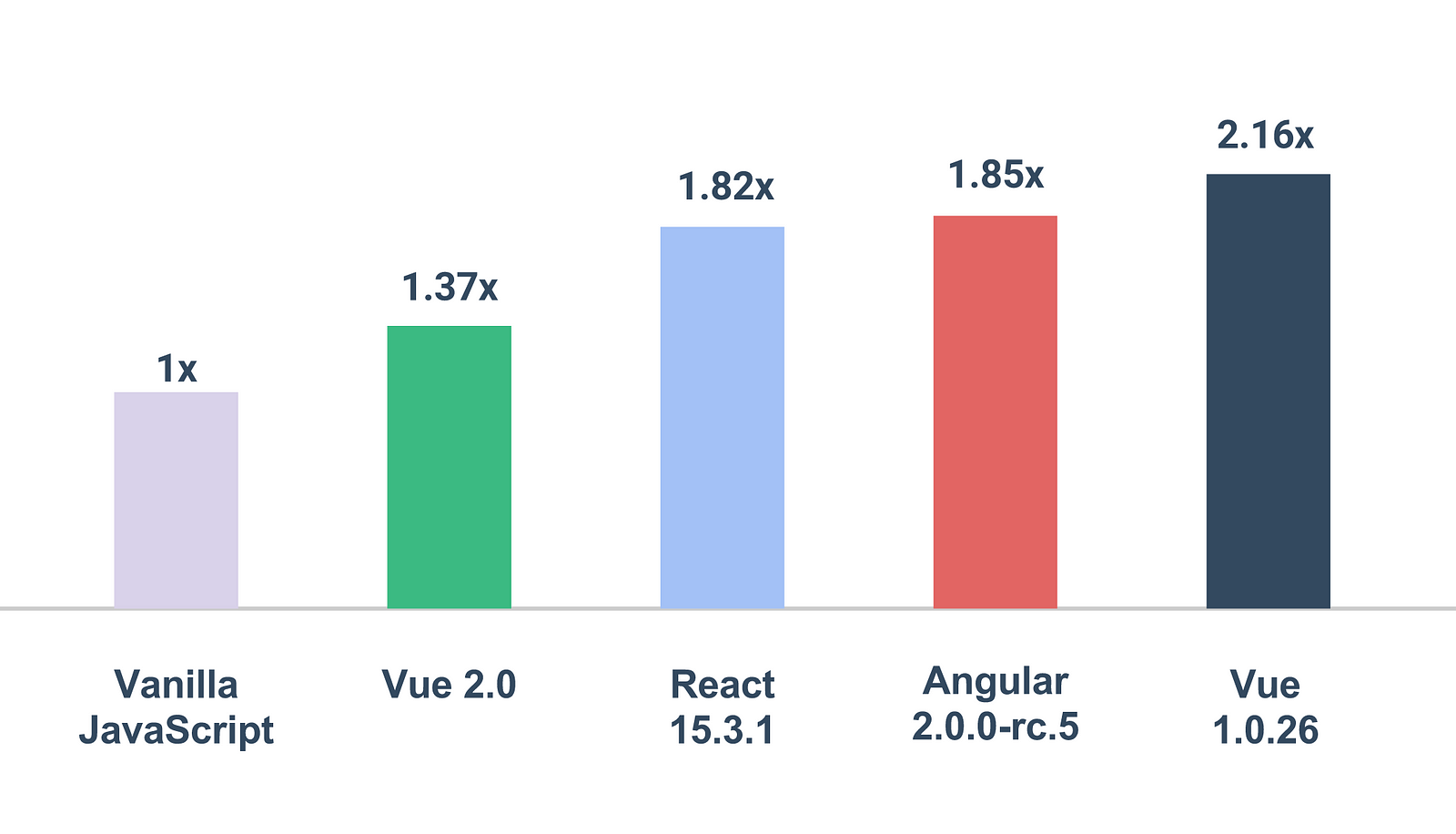
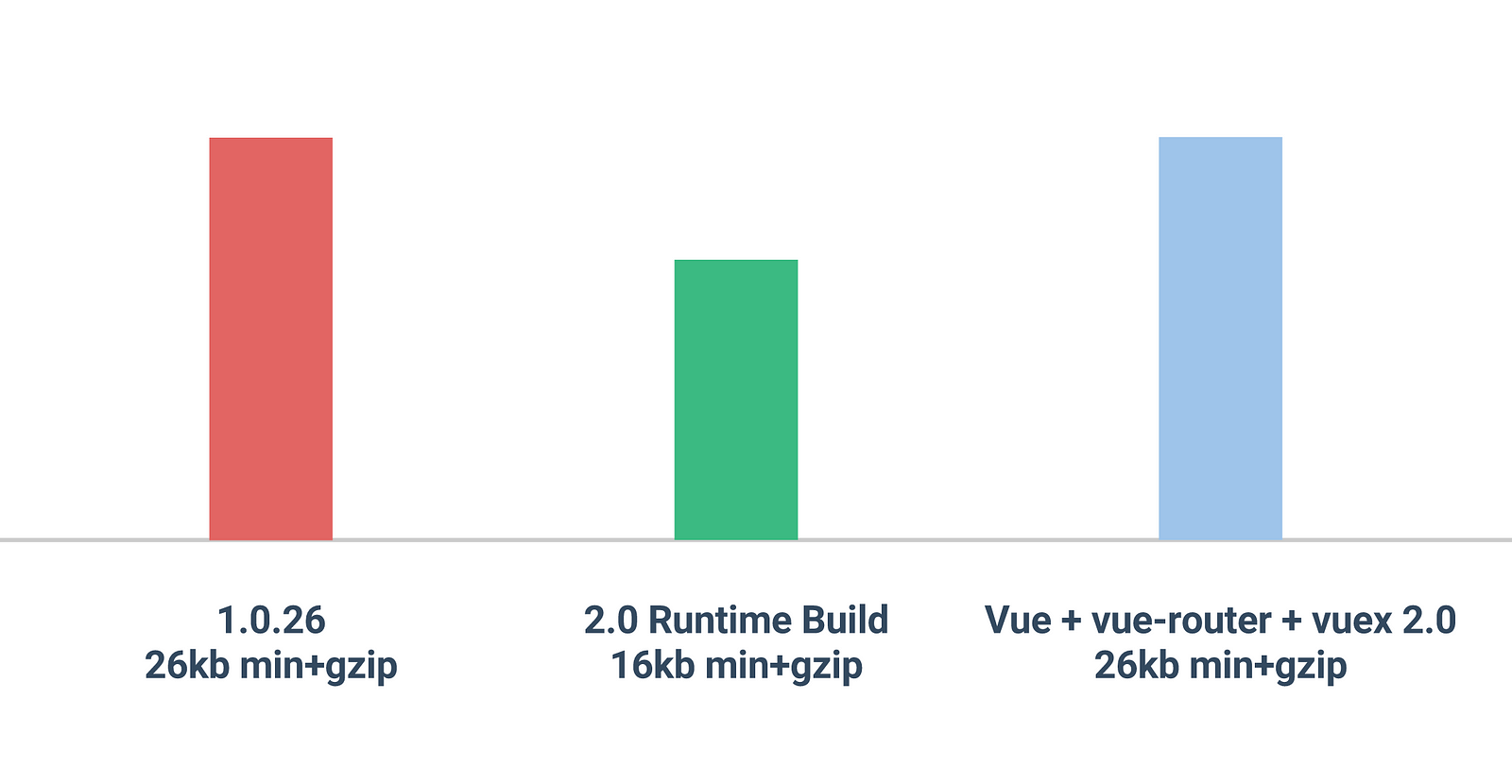
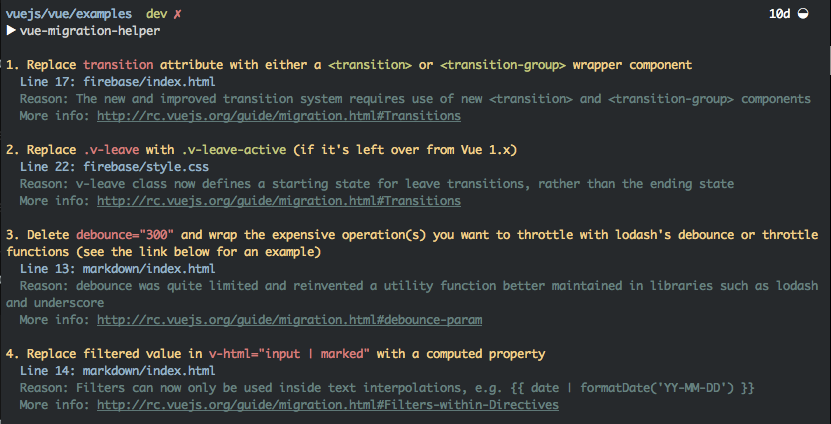
    <content type="html"><![CDATA[<p>このブログは<a href="https://medium.com/the-vue-point/vue-2-0-is-here-ef1f26acf4b8#.70i8p9m8i" target="_blank" rel="noopener">こちら</a>の翻訳ブログです。</p><p>今日（日本時間:2016/10/1）、私は <a href="https://github.com/vuejs/vue/releases/tag/v2.0.0" target="_blank" rel="noopener">Vue.js 2.0：Ghost in the Shell（攻殻機動隊）</a>の公式リリース発表に興奮しています。8つのアルファ、8つのベータ、そして8つの RC（全てが偶然の一致！）の後、Vue.js 2.0 は製品版の準備ができています！公式ガイドは完全に更新され、<a href="https://vuejs.org/guide/">vuejs.org/guide</a> で入手可能です（訳注：日本語版は翻訳作業中です）。遡ること 4 月に 2.0 の作業を開始して以来、<a href="https://github.com/orgs/vuejs/people" target="_blank" rel="noopener">コアチーム</a>は API の設計、バグ修正、ドキュメントおよび Typescript での型付け（そう、npm パッケージで出荷された vue core、vue-router、そして vuex 2.0 はすべて TypeScript での型付けを持っています）に多大な貢献を行いました。そしてコミュニティもまた、API の変更に非常に貴重なフィードバックを提供してくれました。</p><h2 id="2-0-の新機能"><a href="#2-0-の新機能" class="headerlink" title="2.0 の新機能"></a>2.0 の新機能</h2><h3 id="性能"><a href="#性能" class="headerlink" title="性能"></a>性能</h3><p><img src="https://cdn-images-1.medium.com/max/1600/1*Lu6OJiraJYShl4aBppoh3w.png" alt="Benchmarks"></p><figcaption style="font-size:14px;text-align:center;">第3者の<a href="http://stefankrause.net/js-frameworks-benchmark4/webdriver-ts/table.html" target="_blank" rel="noopener">ベンチマーク</a>による。小さいほど性能が良い</figcaption><p>レンダリング層は <a href="https://github.com/snabbdom/snabbdom" target="_blank" rel="noopener">snabbdom</a> から fork された軽量な仮想 DOM の実装を使って書き直されました。その上で、Vue のテンプレートコンパイラはコンパイル時にいくつかの賢い最適化、たとえば再レンダリングでの不要な差分抽出を回避するための分析や静的なサブツリーの巻き上げを適用することが可能です。新しいレンダリング層は v1 に比べて大幅なパフォーマンス向上を提供し、Vue 2.0 は現存する最速のフレームワークの1つとなります。加えて、Vue のリアクティブシステムは大規模で複雑なコンポーネントツリーの再レンダリングが必要なコンポーネントを正確に決定することができるので、最適化の観点から最小限の労力で済みます。</p><p><img src="https://cdn-images-1.medium.com/max/1600/1*xV2_bx4eWC9RXiBZjeAMrw.png" alt="Size"><br>2.0 ランタイムのみのビルドはわずか 16kb（min+gzip時）と軽量であることにも言及する価値があります。vue-router と vuex を含めても合計 26kb であり、これは単体の v1 core と同等です！</p><h3 id="Render-関数"><a href="#Render-関数" class="headerlink" title="Render 関数"></a>Render 関数</h3><p>レンダリング層の全面改修にもかかわらず、Vue の 2.0 は大部分が 1.0 と互換性のあるテンプレート構文を維持しますが、わずかな非推奨があります。テンプレートは内部的に仮想 DOM Render 関数にコンパイルされますが、JavaScript の柔軟性を必要とする際には自前の Render 関数自身をユーザーが直接選択することができます。また、JSX を好む人のためにオプションの <a href="https://github.com/vuejs/babel-plugin-transform-vue-jsx" target="_blank" rel="noopener">JSX をサポート</a>もあります。</p><p>Render 関数は強力なコンポーネントベースパターンのための可能性を開くものです。例えば、新しいトランジションシステムは現在完全なコンポーネントベースですが、これは内部で Render 関数を使用しています。</p><h3 id="サーバーサイドレンダリング"><a href="#サーバーサイドレンダリング" class="headerlink" title="サーバーサイドレンダリング"></a>サーバーサイドレンダリング</h3><p>Vue 2.0 は強烈な高速レンダリングを実現するため、ストリーミングおよびコンポーネントレベルキャッシングを使用してのサーバーサイドレンダリング（SSR）をサポートしました。加えて、vue-router と vuex 2.0 はユニバーサルルーティングとクライアントサイド状態補給 (state hydration) を使用して SSR をサポートするように設計されています。<a href="https://github.com/vuejs/vue-hackernews-2.0/" target="_blank" rel="noopener">vue-hackernews-2.0 demo app</a> の中でそれら全てが一緒に働いているので参照してください。</p><h3 id="サポートライブラリ"><a href="#サポートライブラリ" class="headerlink" title="サポートライブラリ"></a>サポートライブラリ</h3><p>公式サポートライブラリとツール vue-router、vuex、vue-loader と vueify はすべて 2.0 をサポートするように更新されました。<strong>vue-cli は現在デフォルトで 2.0 ベースのプロジェクトの土台を作るツールです。</strong> </p><p>特に、vue-router と vuex はともにそれぞれの 2.0 バージョンで多くの改善を受けています:</p><h4 id="vue-router"><a href="#vue-router" class="headerlink" title="vue-router"></a>vue-router</h4><ul><li>複数の名前付き<code>&lt;router-view&gt;</code>サポート</li><li><code>&lt;router-link&gt;</code>コンポーネントでの改善されたナビゲーション</li><li>簡素化されたナビゲーションフックAPI</li><li>カスタマイズ可能なスクロールの挙動制御</li><li><a href="https://github.com/vuejs/vue-router/tree/dev/examples" target="_blank" rel="noopener">より包括的な例</a></li></ul><h4 id="vuex"><a href="#vuex" class="headerlink" title="vuex"></a>vuex</h4><ul><li>コンポーネントでの使用の簡素化</li><li>改善されたモジュール API でのより良いコードの構造化</li><li>構成可能な非同期アクション</li></ul><p>詳細については、それぞれの2.0のドキュメントを参照してください：</p><ul><li><a href="http://router.vuejs.org/" target="_blank" rel="noopener">http://router.vuejs.org/</a></li><li><a href="http://vuex.vuejs.org/" target="_blank" rel="noopener">http://vuex.vuejs.org/</a></li></ul><h3 id="コミュニティプロジェクト"><a href="#コミュニティプロジェクト" class="headerlink" title="コミュニティプロジェクト"></a>コミュニティプロジェクト</h3><p>中国で最大のオンライン食品発注プラットフォームである <a href="https://github.com/ElemeFE/" target="_blank" rel="noopener">Ele.me のチーム</a>は、既に<a href="https://github.com/ElemeFE/element" target="_blank" rel="noopener">完全なデスクトップ UI コンポーネントライブラリ</a>を Vue 2.0 で構築しています。残念ながらドキュメントはまだ英語版がありませんが、彼らはそれに取り組んでいます！</p><p>他の多くのコミュニティプロジェクトもまた 2.0 互換性を持つように更新しました。<a href="https://github.com/vuejs/awesome-vue" target="_blank" rel="noopener">awesome-vue</a> をチェックし、ページ内で “2.0” を検索してください。</p><h2 id="1-0-からの移行"><a href="#1-0-からの移行" class="headerlink" title="1.0 からの移行"></a>1.0 からの移行</h2><p>もし Vue が初めてなら、今 2.0 で開始することは考えるまでもありません。しかし現在の 1.0 ユーザーのための最大の疑問は、どうやって新しいバージョンに移行するかです。</p><p><img src="https://cdn-images-1.medium.com/max/1600/1*157Ly5X6gx0C2CIvsMaNog.png" alt="migration"></p><p>移行プロセスを支援するために、チームは CLI の移行ヘルパーと合わせ非常に詳細な移行ガイドに取り組んできました。このツールはすべての非推奨を検知することはできないものの、あなたが幸先の良いスタートを得ることを確実に助けることでしょう。</p><h2 id="もう一つ・・・"><a href="#もう一つ・・・" class="headerlink" title="もう一つ・・・"></a>もう一つ・・・</h2><p>中国最大の電子商取引企業であるアリババのエンジニアは、Weex というプロジェクトに取り組んできました。これはネイティブモバイル UI の中に Vue 風の構文で記述された render コンポーネントです。しかしすぐに、”Vue 風の”は “Vue によって”になります。私たちは Weex のための Vue 2.0 で実際に JavaScript ランタイムフレームワークを作るために公式のコラボレーションを開始しました。これは Web、iOS、そして Android の間で再利用可能なユニバーサル Vue コンポーネントをユーザーが作成するために役立ちます！コラボレーションはまだ初期段階ですが、2.0 が公開されたことが今私たちには大きな焦点となりますので、ご期待ください！</p><p>（もちろん、それは ReactNative や NativeScript 同様にネイティブです。Cordova とは違います。）</p><p>Vue は個人サイドプロジェクトとしての謙虚な始まりから多くを発展させてきました。今日では<a href="https://www.patreon.com/evanyou" target="_blank" rel="noopener">コミュニティファンド化され</a>、<a href="https://www.quora.com/How-popular-is-VueJS-in-the-industry/answer/Evan-You-3?__snid3__=365957938&amp;__nsrc__=2&amp;__filter__" target="_blank" rel="noopener">広く現実世界で採用され</a>、そして <a href="https://stats.js.org" target="_blank" rel="noopener">stats.js.org</a> によるとすべての JavaScript ライブラリの中でも最も強力な成長傾向を誇っています。私たちは 2.0 がさらにそれを後押しすると信じています。これは開始以来の Vue の最大の更新であり、私たちはあなたが Vue で構築するものを見ることに興奮しています。関係者の皆さま本当にありがとうございました！</p>]]></content>
    
    <summary type="html">


        &lt;p&gt;このブログは&lt;a href=&quot;https://medium.com/the-vue-point/vue-2-0-is-here-ef1f26acf4b8#.70i8p9m8i&quot; target=&quot;_blank&quot; rel=&quot;noopener&quot;&gt;こちら&lt;/a&gt;の翻訳ブログです。&lt;
      
    
    </summary>
    
    
  </entry>
  
  <entry>
    <title>Vue.js 2.0 の発表</title>
    <link href="http://vuejs.org/2016/04/27/announcing-2.0/"/>
    <id>http://vuejs.org/2016/04/27/announcing-2.0/</id>
    <published>2016-04-27T04:33:00.000Z</published>
    <updated>2020-09-20T15:47:21.590Z</updated>
    
    <content type="html"><![CDATA[<p>本日、多くのエキサイティングな改善と新しい機能を盛り込んだ、 Vue.js 2.0 の最初のパブリックプレビュー (public preview) を発表してゾクゾクしています。何が起こっているのかのぞいてみましょう！</p><h2 id="さらにスリム、さらに高速"><a href="#さらにスリム、さらに高速" class="headerlink" title="さらにスリム、さらに高速"></a>さらにスリム、さらに高速</h2><p>Vue.js は軽くて速いままでいることに常に焦点を当てて来ましたが、2.0 はさらにそれを推し進めます。レンダリングレイヤは、現在軽量な仮想 DOM 実装 (<a href="https://github.com/paldepind/snabbdom" target="_blank" rel="noopener">Snabbdom</a>) に基づいており、初期レンダリング速度とメモリ消費量は大抵のシナリオにおいて 2 〜 4 倍まで改善します(<a href="https://github.com/vuejs/vue/tree/next/benchmarks" target="_blank" rel="noopener">これらのベンチマーク</a>を調べてみてください)。テンプレートから仮想 DOM にするコンパイラとランタイムは分離することができ、そのため、テンプレートをプリコンパイルしたり、ランタイムだけによるあなたのアプリケーションを提供できます。min+gzip されたランタイムは 12 キロバイト未満です (参考として、React 15 は min+gzip で 44 キロバイトです)。また、コンパイラはブラウザ上で動作します。これは、以前と同様に、script タグを差し込むだけでハッキングを開始できることを意味します。ビルドにコンパイラを含めた場合でも、ファイルサイズは 17 キロバイト (min+gzip) にとどまり、現在の 1.x ビルドよりもまだ軽量です。</p><h2 id="普通の-Virtual-DOM-ではありません"><a href="#普通の-Virtual-DOM-ではありません" class="headerlink" title="普通の Virtual-DOM ではありません"></a>普通の Virtual-DOM ではありません</h2><p>現在、非常に多くの実装があるので仮想 DOM は退屈に聞こえますが、これは違います。Vue のリアクティブシステムと組み合わせることで、あなたは何もすることもなく、形にとらわれない最適化された再レンダリングを提供します。各コンポーネントはレンダリング中にそのリアクティブな依存関係を追跡するため、再レンダリングするときシステムは正確に知っており、<code>shouldComponentUpdate</code> または不変(immutable)なデータは必要ありません。<strong>それだけで動作します</strong>。</p><p>また、Vue 2.0 はテンプレートから仮想 DOM にコンパイルするフェーズにいくつかの高度な最適化を適用します:</p><ol><li><p>静的なクラス名と属性を検出し、その結果それらは最初のレンダリング後、差分(diff) を取ることはありません:</p></li><li><p>最大限の静的なサブツリー(動的バインディングなしのサブツリー)と render 関数からそれらを巻き上げます。このため、それぞれにおける再レンダリングは、直接まったく同じ仮想 Node を再利用し、差分検出をスキップします。</p></li></ol><p>これらの高度な最適化は、JSX を使用するとき、通常 Babel プラグインを介して達成することができますが、Vue 2.0 でブラウザ内のコンパイラを使用してそれらを得ることができます。</p><p>新しいレンダリングシステムはまた、あなたのデータを凍結したり手動で強制的に更新することによって、リアクティブの転換を無効にすることができ、本質的に再レンダリング処理をあなたに完全に制御を与えます。</p><p>これらの技術を組み合わせると、Vue 2.0 は複雑なアプリケーションに対して非常に高速なアップデートを保証し、開発者から最小限の労力を必要とします。</p><h2 id="テンプレート、JSX-、または-Hyperscript？"><a href="#テンプレート、JSX-、または-Hyperscript？" class="headerlink" title="テンプレート、JSX 、または Hyperscript？"></a>テンプレート、JSX 、または Hyperscript？</h2><p>開発者はテンプレート 対 JSX に強い感情を持つ傾向があります。一方では、テンプレートは HTML に近いです。それらは、あなたのアプリケーションのセマンティックな構造により良いマッピングをし、設計とレイアウトとスタイリングについて視覚的に考えることが遥かに容易になります。一方で、JSX / hyperscript は計算完備(turing-complete)の完全な表現力を提供しつつ、テンプレートは DSL に制限されています。</p><p>デザイナー/開発者のハイブリッドであること、私はテンプレートで自分のインターフェイスのほとんどを書くことを好みますが、特定の場合においては、JSX / hyperscript の柔軟性を見逃しません。例としては、プログラム的に子を処理するコンポーネントを書き込む、テンプレートベースの slot 機構を備えた実現可能なものです。</p><p>さて、なぜ、両方持っていないのでしょうか？ Vue 2.0 では、使い慣れたテンプレートの構文を使い続けることができ、また、いつでもテンプレートの DSL によって制約を感じるたびに、仮想 DOM に飛び降りることができます。<code>template</code> オプションの代わりに、<code>render</code> 関数でそれを置き換えます。あなたのテンプレートで特別な <code>&lt;render&gt;</code> タグを使用してレンダリング関数を埋め込むことができます！同じフレームワークにおいて、両方の長所があります。</p><h2 id="サーバサイドレンダリングのストリーミング"><a href="#サーバサイドレンダリングのストリーミング" class="headerlink" title="サーバサイドレンダリングのストリーミング"></a>サーバサイドレンダリングのストリーミング</h2><p>仮想 DOM への移行では、Vue 2.0 は自然にクライアントサイド hydration によるサーバサイドレンダリングをサポートします。現在主流のサーバサイドレンダリング実装の辛いところは、React のような、アプリケーションが複雑な場合、サーバのイベントループをブロックすることができるため、レンダリングは同期であることです。同期的なサーバサイドレンダリングは、クライアント上のコンテンツに悪影響を与える可能性があります。Vue 2.0 は形にとらわれないサーバサイドレンダリングのストリーミングを提供するため、あなたのコンポーネントをレンダリングすることができ、読み込み可能なストリームを取得し、直接 それを HTTP レスポンスにパイプすることができます。これは、あなたのサーバが機敏に応答でき、あなたのユーザーにより速くレンダリングされたコンテンツを提供するのを保証します。</p><h2 id="より多くの可能性をロックしません"><a href="#より多くの可能性をロックしません" class="headerlink" title="より多くの可能性をロックしません"></a>より多くの可能性をロックしません</h2><p>新しいアーキテクチャでは、模索するための多くの可能性があります。例えば、モバイル上でネイティブインターフェイスにレンダリングできます。現在我々は、中国最大の技術企業「アリババグループ」でのエンジニアによって維持されているプロジェクト <a href="http://alibaba.github.io/weex/" target="_blank" rel="noopener">weex</a> をネイティブレンダリングのバックエンドとして使用する、Vue.js 2.0 の移植について模索しています。ReactNative 内部で実行するために Vue 2.0 の仮想 DOM を適合させることは技術的に可能です。我々は、どうなっていくのか興奮しています！</p><h2 id="互換性そして何を次に期待するのか"><a href="#互換性そして何を次に期待するのか" class="headerlink" title="互換性そして何を次に期待するのか"></a>互換性そして何を次に期待するのか</h2><p>Vue.js 2.0 はまだ pre-alpha ですが、<a href="https://github.com/vuejs/vue/tree/next/" target="_blank" rel="noopener">ここ</a>でソースコードを調べることができます。完全な書き直しにも関わらず、1.0 API は、いくつかの意図的な非推奨の例外をのぞいて、1.0 と互換性があります。<a href="https://github.com/vuejs/vue/tree/next/examples" target="_blank" rel="noopener">2.0 で書かれた同じ公式の example</a>を調べてみてください。あまり変わっていないことを確認できるでしょう！</p><p>機能を非推奨とすることは、最大限の開発者の生産性に対して可能な限り単純なAPIを提供するための継続的な努力の一環です。1.0 と 2.0 の機能比較を<a href="https://github.com/vuejs/vue/wiki/2.0-features" target="_blank" rel="noopener">ここ</a>で調べることができます。これは、あなたがこれらの廃止機能のいくつかヘビーに使用している場合、恐らくアプリケーションを移行するためにいくつか労力を要することを意味しますが、将来においてより詳細な移行ガイドを提供するつもりです。</p><p>まだ、完了するために残っている仕事はかなりあります。我々は十分なテストカバレッジに達した時、最初の alpha をリリースする予定であり、5月末または6月頭までに beta を目指しています。多くのテストに加えて、我々は、ライブラリ (vue-router、Vuex、vue-loader、vuerify など) のサポートのアップデートも必要です。現在のところ、Vue.js 2.0 ですぐに使えるのは Vuex のみですが、我々が 2.0 を提供するときには、全てが一緒にスムーズに動作するでしょう。</p><p>我々は、1.x についても忘れていません！ 1.1 は、9ヶ月のセキュリティアップデートと6ヶ月の致命的なバグ修正の LTS (Long-term Support) 期間によって、2.0 beta と並んでリリースされます。また、2.0 にアップグレードするためにあなたが準備できるよう、任意の非推奨の警告も提供する予定です。乞うご期待下さい！</p>]]></content>
    
    <summary type="html">


        &lt;p&gt;本日、多くのエキサイティングな改善と新しい機能を盛り込んだ、 Vue.js 2.0 の最初のパブリックプレビュー (public preview) を発表してゾクゾクしています。何が起こっているのかのぞいてみましょう！&lt;/p&gt;
&lt;h2 id=&quot;さらにスリム、さらに高速&quot;&gt;&lt;
      
    
    </summary>
    
    
  </entry>
  
  <entry>
    <title>2016年3月最新情報</title>
    <link href="http://vuejs.org/2016/03/14/march-update/"/>
    <id>http://vuejs.org/2016/03/14/march-update/</id>
    <published>2016-03-14T09:45:00.000Z</published>
    <updated>2020-09-20T15:47:21.590Z</updated>
    
    <content type="html"><![CDATA[<h2 id="コミュニティの成長"><a href="#コミュニティの成長" class="headerlink" title="コミュニティの成長"></a>コミュニティの成長</h2><p>この1年間における Vue の成長は素晴らしいです。今現在、GitHub では 15,000 を超えるスターがあり、npm から 500k を超えるダウンロード、そして Gitter チャンネルでは 2,000 ユーザーを超えています。何よりも、コミュニティによってロンドンで最初の<a href="http://www.meetup.com/London-Vue-js-Meetup/" target="_blank" rel="noopener">ミートアップ</a>とパリで最初の<a href="http://www.meetup.com/Vuejs-Paris/?scroll=true" target="_blank" rel="noopener">ミートアップ</a>がうまく開催されたのは、大変エキサイティングです！ミートアップの主催者である <a href="https://twitter.com/JackBarham" target="_blank" rel="noopener">Jack</a>、<a href="https://twitter.com/onejamesbrowne/" target="_blank" rel="noopener">James</a> そして <a href="https://twitter.com/posva/" target="_blank" rel="noopener">Eduardo</a> に大変感謝いたします。</p><a id="more"></a><p>あなたの周りの Vue.js ユーザーと接することや Vue.js の使用についてあなたの知見を共有することに興味があるならば、ローカルなミートアップに参加することは素晴らしいアイデアです。ミートアップを開催できたらとしたら、素晴らしいです :)</p><h2 id="作られたクールなもの"><a href="#作られたクールなもの" class="headerlink" title="作られたクールなもの"></a>作られたクールなもの</h2><p>もっともっと素晴らしい物が Vue で作られています。<a href="https://pagekit.com/" target="_blank" rel="noopener">PageKit</a>、Laravel Spark (近日公開)と <a href="https://v2.statamic.com/" target="_blank" rel="noopener">Statamic</a> のようなプロダクトや、<a href="http://koel.phanan.net/" target="_blank" rel="noopener">Koel</a> と <a href="https://github.com/Zhangdroid/Gokotta" target="_blank" rel="noopener">Gokotta</a> のようなきれいなアプリケーション、<a href="http://yuche.github.io/vue-strap/" target="_blank" rel="noopener">VueStrap</a> と <a href="http://posva.net/vue-mdl/" target="_blank" rel="noopener">Vue-MDL</a> のような UI コンポーネント、そして <a href="https://adblitz.withyoutube.com" target="_blank" rel="noopener">YouTube Adblitz</a> と <a href="https://newsfeed.fb.com/" target="_blank" rel="noopener">Facebook NewsFeed Marketing Site</a> のような素晴らしいインタラクティブな体験をさせるものがあります！</p><p>多くの他のすごいプロジェクトがありますが、ここでは多すぎてリストアップできませんが、<a href="https://github.com/vuejs/awesome-vue" target="_blank" rel="noopener">awesome-vue</a> でそれらを確認することができます。Vue ですごいものを作ったならば、そのリストにそれらを追加しましょう！</p><h2 id="プロジェクトに対する新しいビジョン"><a href="#プロジェクトに対する新しいビジョン" class="headerlink" title="プロジェクトに対する新しいビジョン"></a>プロジェクトに対する新しいビジョン</h2><p>最近、Vue.js のコアレポジトリで開発が鈍くなっているのに気づいたかもしれません。その間は、<a href="https://github.com/vuejs/vuex" target="_blank" rel="noopener">Vuex</a>、<a href="https://github.com/vuejs/vue-devtools" target="_blank" rel="noopener">vue-devtools</a> そして公式 <a href="https://github.com/vuejs-templates/webpack" target="_blank" rel="noopener">Webpack ボイラープレートプロジェクト</a> と他のサブプロジェクトにたくさんの労力を注いでいました。次のステップは <a href="https://github.com/vuejs/vue-router" target="_blank" rel="noopener">vue-router</a>と大規模なシングルページアプリケーションで Vue.js のコアが Vuex そして vue-router といっしょに動作するドキュメント、例、そしてデモのリリースです。</p><p>これら全ては、異なる複雑なレベルに適応できるプログレッシブフレームワーク (progressive framework) という新しいビジョンに向けて一緒に Vue.js  プロジェクトに追加します。Vue.js コアは “view 層” のままです。jQuery をリプレースするため既存のページを Vue と置き換えることができますが、Vue.js プロジェクトは シングルページアプリケーションのためにより完全で独断的なフレームワークとして一緒に動作する vue-router 、Vuex 、vue-loader/vueify そして vue-cli のような他の部分を含んでいます。これに関する詳細は、後で投稿します。</p><h2 id="Vue-js-はあなたの助けを必要としています！"><a href="#Vue-js-はあなたの助けを必要としています！" class="headerlink" title="Vue.js はあなたの助けを必要としています！"></a>Vue.js はあなたの助けを必要としています！</h2><p>オープンソースは素晴らしく、そして私は Vue.js が世上で実プロダクトを構築する人々の助けになっているのを誇りに思います。しかしながら、プロジェクトが大きくなるにつれて、全てを維持しながら新しい機能をプッシュすることは大変厳しい仕事です。良いニュースはあなたが助けることができます！</p><h3 id="協力者を探しています"><a href="#協力者を探しています" class="headerlink" title="協力者を探しています"></a>協力者を探しています</h3><p>たびたび、様々な方法で手助けするユーザーが既におりますが、これは公式な招待状になります。現在ほとんど私一人ですが、私は”チーム”に参加して貢献出来る方を探しています。もしあなたが興味あるならば、<a href="https://docs.google.com/forms/d/1SgDgKZqyivEf5xl0EOWNfs68Xy3f4oBzLXIlwlS0BIs/viewform" target="_blank" rel="noopener">こちら</a>をごらんください。</p><h3 id="スポンサーを探しています"><a href="#スポンサーを探しています" class="headerlink" title="スポンサーを探しています"></a>スポンサーを探しています</h3><p>Vue の開発が持続可能を支援するためのもう1つの方法は、直接資金支援を提供して頂くことです。より資金支援を私が受け取ることで、より多くの時間を Vue をより良い開発に費やすことができます。</p><p>もしあなたがビジネスをしていて、収益を創出するプロダクトで Vue を使用している場合は、Vue の開発のスポンサーすることでビジネスとして意味をなすでしょう。あなたのプロダクトが健全を保証し、かつ前向きに維持されるプロジェクトを保証します。また Vue コミュニティにあなたの公表を助けることができ、Vue 開発者を引き付けるのが容易になります。</p><p>もしあなたが個人ユーザーで Vue を使用して生産性を楽しめている場合は、たまには私にコーヒーを買うように、感謝の印として寄付をご検討頂くことができます :)</p><p>いずれの場合も、Vue の<a href="https://www.patreon.com/evanyou" target="_blank" rel="noopener">パトロンキャンペーン</a>を通じて資金を繰り返し提供して頂くか、また <a href="https://www.paypal.me/evanyou" target="_blank" rel="noopener">PayPal</a> 経由で1回限りの寄付金を提供して頂けます。多くのアイデアが Vue に対してあるため、準備はしていましたが、着手する時間がありませんでしたので、私はぜひともそれらフルタイムで働きたいです。私はそれを実現するために私を助けて頂けるのを願っています！</p>]]></content>
    
    <summary type="html">
    
      &lt;h2 id=&quot;コミュニティの成長&quot;&gt;&lt;a href=&quot;#コミュニティの成長&quot; class=&quot;headerlink&quot; title=&quot;コミュニティの成長&quot;&gt;&lt;/a&gt;コミュニティの成長&lt;/h2&gt;&lt;p&gt;この1年間における Vue の成長は素晴らしいです。今現在、GitHub では 15,000 を超えるスターがあり、npm から 500k を超えるダウンロード、そして Gitter チャンネルでは 2,000 ユーザーを超えています。何よりも、コミュニティによってロンドンで最初の&lt;a href=&quot;http://www.meetup.com/London-Vue-js-Meetup/&quot; target=&quot;_blank&quot; rel=&quot;noopener&quot;&gt;ミートアップ&lt;/a&gt;とパリで最初の&lt;a href=&quot;http://www.meetup.com/Vuejs-Paris/?scroll=true&quot; target=&quot;_blank&quot; rel=&quot;noopener&quot;&gt;ミートアップ&lt;/a&gt;がうまく開催されたのは、大変エキサイティングです！ミートアップの主催者である &lt;a href=&quot;https://twitter.com/JackBarham&quot; target=&quot;_blank&quot; rel=&quot;noopener&quot;&gt;Jack&lt;/a&gt;、&lt;a href=&quot;https://twitter.com/onejamesbrowne/&quot; target=&quot;_blank&quot; rel=&quot;noopener&quot;&gt;James&lt;/a&gt; そして &lt;a href=&quot;https://twitter.com/posva/&quot; target=&quot;_blank&quot; rel=&quot;noopener&quot;&gt;Eduardo&lt;/a&gt; に大変感謝いたします。&lt;/p&gt;
    
    </summary>
    
    
  </entry>
  
  <entry>
    <title>よくある初心者の落とし穴</title>
    <link href="http://vuejs.org/2016/02/06/common-gotchas/"/>
    <id>http://vuejs.org/2016/02/06/common-gotchas/</id>
    <published>2016-02-06T01:00:00.000Z</published>
    <updated>2020-09-20T15:47:21.590Z</updated>
    
    <content type="html"><![CDATA[<p>Vue.js を使い始めたユーザーからたびたび幾つかの種類の質問があります。それらの質問の回答はガイドでどこかに全て言及していますが、落とし穴にはまったときそれらはあまり目ただず、そして見つけるのは難しいです。そこで、この記事では、うまくいけば、無駄な時間を節約できるよう、それらの落とし穴についてまとめたものを紹介します！</p><a id="more"></a><h3 id="なぜ-DOM-更新をしないのですか？"><a href="#なぜ-DOM-更新をしないのですか？" class="headerlink" title="なぜ DOM 更新をしないのですか？"></a>なぜ DOM 更新をしないのですか？</h3><p>ほとんどの場合、あなたが Vue インスタンスのデータを変更するとき、view を更新します。しかし、2 つの稀なケースがあります:</p><ol><li><p>データが監視されるときに、あなたが追加する<strong>新しいプロパティ</strong>が存在しない場合。ES5 の制限とブラウザ間で一貫性のある動作を確保するために、Vue.js はプロパティの追加/削除を検出することはできません。ベストプラクティスは前もってリアクティブにする必要があるプロパティを常に宣言します。あなたが実行時にプロパティを追加または削除する必要がある場合は、グローバルな <a href="/api/#Vue-set"><code>Vue.set</code></a> または <a href="/api/#Vue-delete"><code>Vue.delete</code></a> メソッドを使用します。</p></li><li><p>あなたが直接インデックス(例: <code>arr[0] = val</code>) を設定、または <code>length</code> プロパティを変更することによって配列を変更する場合。同様に、Vue.js はこれらの変更をピックアップすることはできません。常に配列のインスタンスメソッドを使用することよって配列を変更、またはそれを完全に置き換えます。Vue は <code>arr.splice(index, 1, value)</code> に対するまさにシンタックスシュガーである便利メソッド <code>arr.$set(index, value)</code> を提供します。</p></li></ol><p>参考文献: <a href="/guide/reactivity.html">リアクティブの探求</a> と <a href="/guide/list.html#配列の変化を検出">配列の変化を検出</a></p><h3 id="いつ-DOM-が更新されますか？"><a href="#いつ-DOM-が更新されますか？" class="headerlink" title="いつ DOM が更新されますか？"></a>いつ DOM が更新されますか？</h3><p>Vue.js はまとめて DOM を更新するために非同期キューを使用します。これはあなたがいくつかのデータを変更するとき、DOM の更新は瞬時に発生しないことを意味します。それらはキューがフラッシュされたとき非同期に適用されます。そこで、あなたは DOM が更新されたときにどうやって知るのでしょうか？あなたがデータを変更後、<code>Vue.nextTick</code> を使用するのが正解です。キューがフラッシュされた後、あなたが渡すそのコールバック関数が一度だけ呼ばれます。</p><p>参考文献: <a href="/guide/reactivity.html#非同期更新キュー">非同期更新キュー</a></p><h3 id="なぜ-data-は関数として必要なのですか？"><a href="#なぜ-data-は関数として必要なのですか？" class="headerlink" title="なぜ data は関数として必要なのですか？"></a>なぜ <code>data</code> は関数として必要なのですか？</h3><p>基本的な例では、<code>data</code> は直接プレーンなオブジェクトとして宣言しています。これは、<code>new Vue()</code> によって単一のインスタンスだけが作成されるためです。しかしながら、<strong>コンポーネント</strong>を定義するときは、<code>data</code> は初期データオブジェクトを返す関数として宣言されなければなりません。なぜでしょうか？同じ定義を使用して作成された多くのインスタンスがあるからです。まだ <code>data</code> に対してプレーンなオブジェクトを使用している場合、同じオブジェクトが作成された全てのインスタンス全体を横断して<strong>参照によって共有</strong>されます！<code>data</code> 関数を提供することによって、新しいインスタンスが作成される度に、単にそれは初期データの新しいコピーを返すための関数として呼び出すことができます。</p><p>参考文献: <a href="/guide/components.html#コンポーネントオプションの注意事項">コンポーネントオプションの注意事項</a></p><h3 id="HTML-は小文字・大文字を区別しない"><a href="#HTML-は小文字・大文字を区別しない" class="headerlink" title="HTML は小文字・大文字を区別しない"></a>HTML は小文字・大文字を区別しない</h3><p>全ての Vue.js テンプレートは有効で、解析可能な HTML マークアップ、そして Vue.js はそのテンプレートを処理するために仕様に準拠するパーサーに依存しています。しかしながら、標準で指定された、HTML はタグと属性名がマッチする小文字・大文字を区別しません。これは <code>:myProp=&quot;123&quot;</code> のようなキャメルケース属性は<code>:myprop=&quot;123&quot;</code>としてマッチされます。経験則として、あなたは JavaScript ではキャメルケースを使用し、テンプレートでは、ケバブケースを使用すべきです。例えば、<code>myProp</code> として JavaScript で定義する prop は <code>:my-prop</code> としてテンプレートでバウンドされるべきです。</p><p>参考文献: <a href="/guide/components.html#キャメルケース_対_ケバブケース">キャメルケース 対 ケバブケース</a></p><p>小文字、大文字を区別しない作法において props そして コンポーネントを解決することによって、この矛盾を解消する可能性を議論しています。<a href="https://github.com/vuejs/vue/issues/2308" target="_blank" rel="noopener">ここ</a>の会話に参加しましょう。</p>]]></content>
    
    <summary type="html">
    
      &lt;p&gt;Vue.js を使い始めたユーザーからたびたび幾つかの種類の質問があります。それらの質問の回答はガイドでどこかに全て言及していますが、落とし穴にはまったときそれらはあまり目ただず、そして見つけるのは難しいです。そこで、この記事では、うまくいけば、無駄な時間を節約できるよう、それらの落とし穴についてまとめたものを紹介します！&lt;/p&gt;
    
    </summary>
    
    
  </entry>
  
  <entry>
    <title>vue-cli を発表</title>
    <link href="http://vuejs.org/2015/12/28/vue-cli/"/>
    <id>http://vuejs.org/2015/12/28/vue-cli/</id>
    <published>2015-12-27T15:00:00.000Z</published>
    <updated>2020-09-20T15:47:21.591Z</updated>
    
    <content type="html"><![CDATA[<p>最近、React プロジェクトを開始するとき、<a href="https://medium.com/@ericclemmons/javascript-fatigue-48d4011b6fc4#.chg95e5p6" target="_blank" rel="noopener">ツールの障害を中心に議論</a> が多くありました。幸いにも Vue.js で、迅速なプロトタイプを開始するために必要な全てのものは、<code>&lt;script&gt;</code> タグを介して CDN から含まれているため、カバーされている部分があります。しかしながら、それは、実際のアプリケーションを構築したいかではありません。実際のアプリケーションでは、必然的に私たちにモジュール化、トランスパイラ、プリプロセッサ、ホットリロード、リント、そしてテストを得るために一定量のツールが必要になります。これらのツールは大規模プロジェクトの長期的な保守性と生産性のために必要ではありますが、初期のセットアップは大きな痛みをともないます。これが <a href="https://github.com/vuejs/vue-cli" target="_blank" rel="noopener">vue-cli</a> を発表する理由で、シンプルな CLI ツールは独断で電池が付属されたビルドセットアップによって、Vue.js プロジェクトの足場をすぐ整えるのに役立ちます。</p><a id="more"></a><h3 id="適切な足場-Scaffolding"><a href="#適切な足場-Scaffolding" class="headerlink" title="適切な足場 (Scaffolding)"></a>適切な足場 (Scaffolding)</h3><p>使用方法は次のようになります:</p><figure class="highlight bash"><table><tr><td class="code"><pre><span class="line">npm install -g vue-cli</span><br><span class="line">vue init webpack my-project</span><br><span class="line"><span class="comment"># プロンプトへ回答</span></span><br><span class="line"><span class="built_in">cd</span> my-project</span><br><span class="line">npm install</span><br><span class="line">npm run dev <span class="comment"># ドジャーン!</span></span><br></pre></td></tr></table></figure><p>全ての CLI は、GitHub 上の <a href="https://github.com/vuejs-templates" target="_blank" rel="noopener">vuejs-templates</a> organization から引っ張っています。依存は、NPM 経由でハンドルされ、そしてビルドスクリプトは単純に NPM scripts です。</p><h3 id="公式テンプレート"><a href="#公式テンプレート" class="headerlink" title="公式テンプレート"></a>公式テンプレート</h3><p>ユーザーができるだけ速く実際のアプリケーションコードを始めることができるように、公式 Vue プロジェクトテンプレートの目的は、電池を内蔵した開発ツールのセットアップを、独断で提供しています。しかしながら、これらのテンプレートは、あなたのアプリケーションコードを構造化する方法の観点では独断ではない、Vue.js に加えてあなたが使用するライブラリも加えることができます。</p><p>全ての公式プロジェクトテンプレートは <a href="https://github.com/vuejs-templates" target="_blank" rel="noopener">vuejs-templates organization</a> のレポジトリにあります。新しいテンプレートが organization に追加されたとき、そのテンプレートを使用するために <code>vue init &lt;template-name&gt; &lt;project-name&gt;</code> を動作させることができます。全ての利用可能な公式テンプレートを確認するために、<code>vue list</code> も動作させることができます。</p><p>現在利用可能なテンプレートは以下を含んでいます:</p><ul><li><p><a href="https://github.com/vuejs-templates/browserify" target="_blank" rel="noopener">browserify</a> - フル装備された Browserify + vueify でホットリロード、リント、単体テストをセットアップ</p></li><li><p><a href="https://github.com/vuejs-templates/browserify-simple" target="_blank" rel="noopener">browserify-simple</a> - シンプルな Browserify + vueify で迅速なプロトタイピングをセットアップ</p></li><li><p><a href="https://github.com/vuejs-templates/webpack" target="_blank" rel="noopener">webpack</a> - フル装備された Webpack + vue-loader ホットリロード、リント、テスト、そして css 抽出</p></li><li><p><a href="https://github.com/vuejs-templates/webpack-simple" target="_blank" rel="noopener">webpack-simple</a> - シンプルな Webpack + vue-loader で迅速なプロトタイピングをセットアップ</p></li></ul><h3 id="あなた自身のセットアップへの導き"><a href="#あなた自身のセットアップへの導き" class="headerlink" title="あなた自身のセットアップへの導き"></a>あなた自身のセットアップへの導き</h3><p>公式テンプレートで嬉しくないなら、これらのテンプレートを fork することができ、それらを特定にニーズに合わせて変更 (またスクラッチからあなた自身の作成すら)でき、そして <code>vue-cli</code> は GitHub レポジトリ上で直接動作できるため、<code>vue-cli</code> 経由でそれらを使用できます:</p><figure class="highlight bash"><table><tr><td class="code"><pre><span class="line">vue init username/repo my-project</span><br></pre></td></tr></table></figure><h3 id="どこでも-Vue-コンポーネント"><a href="#どこでも-Vue-コンポーネント" class="headerlink" title="どこでも Vue コンポーネント"></a>どこでも Vue コンポーネント</h3><p>異なる目的のため、異なるテンプレートがあります。迅速なプロトタイピング向けのシンプルなセットアップ、そして野心的なアプリケーション向けへのフル装備されたセットアップ。これらのテンプレート間での共通の特徴は、それらは全て単一ファイルコンポーネント <code>*.vue</code> をサポートしていることです。これの意味は、確かな <code>*.vue</code> ファイルとして書かれた任意のサードパーティ Vue コンポーネントはこれらをセットアップしてプロジェクト間で共有して使用することができ、そしてシンプルに NPM 上に配信させることができます。より再利用可能なコンポーネントを作成しましょう！</p>]]></content>
    
    <summary type="html">
    
      &lt;p&gt;最近、React プロジェクトを開始するとき、&lt;a href=&quot;https://medium.com/@ericclemmons/javascript-fatigue-48d4011b6fc4#.chg95e5p6&quot; target=&quot;_blank&quot; rel=&quot;noopener&quot;&gt;ツールの障害を中心に議論&lt;/a&gt; が多くありました。幸いにも Vue.js で、迅速なプロトタイプを開始するために必要な全てのものは、&lt;code&gt;&amp;lt;script&amp;gt;&lt;/code&gt; タグを介して CDN から含まれているため、カバーされている部分があります。しかしながら、それは、実際のアプリケーションを構築したいかではありません。実際のアプリケーションでは、必然的に私たちにモジュール化、トランスパイラ、プリプロセッサ、ホットリロード、リント、そしてテストを得るために一定量のツールが必要になります。これらのツールは大規模プロジェクトの長期的な保守性と生産性のために必要ではありますが、初期のセットアップは大きな痛みをともないます。これが &lt;a href=&quot;https://github.com/vuejs/vue-cli&quot; target=&quot;_blank&quot; rel=&quot;noopener&quot;&gt;vue-cli&lt;/a&gt; を発表する理由で、シンプルな CLI ツールは独断で電池が付属されたビルドセットアップによって、Vue.js プロジェクトの足場をすぐ整えるのに役立ちます。&lt;/p&gt;
    
    </summary>
    
    
  </entry>
  
  <entry>
    <title>Vue.js が templateURL をサポートしない理由</title>
    <link href="http://vuejs.org/2015/10/28/why-no-template-url/"/>
    <id>http://vuejs.org/2015/10/28/why-no-template-url/</id>
    <published>2015-10-28T01:56:00.000Z</published>
    <updated>2020-09-20T15:47:21.592Z</updated>
    
    <content type="html"><![CDATA[<p>もともと Angular を使っていて、Vue に移行した新規ユーザから頻繁に寄せられる質問のひとつに「<code>templateURL</code> はありますか？」というものがあります。これについてはかなりの回数お答えしてきましたが、このことについて記事を書いた方が良いとわかりました。</p><a id="more"></a><p>Angular では、<code>templateURL</code> または <code>ng-include</code> を使うことで、外部のテンプレートファイルを実行時に動的ロードすることができます。これらは、組み込み機能としてはとても便利に思えます。しかしこれが解決する問題とは一体何なのか、再考してみましょう。</p><p>最初の1つは、分割した HTML ファイル内にテンプレートを書くと、エディタ内で正しいシンタックスハイライトが付くことです。だからこそ、 HTML ファイルを分割することが好む人がたくさんいるのでしょう。しかし JavaScript コードとテンプレートを分割するのは本当に最善の方法でしょうか？ Vue.js のコンポーネントでは、テンプレートと JavaScript はもともと密接に関連付けられています - 実際のところ、同じファイル内に存在したほうがよりシンプルです。2ファイル間を行ったり来たりするコンテキストの切り替えは、開発体験を悪化させてしまいます。概念的には、コンポーネントとは Vue.js アプリを構成する基本的なブロックであり、テンプレートではありません。すべての Vue.js テンプレートは JavaScript のコンテキストと関連付けられています - それらをさらに引き裂いても意味がありません。</p><p>次に、ファイルを分割して開発する場合、結合するためのビルド手順が必要ですが、<code>templateURL</code> を使うと実行時に Ajax 経由でテンプレートを読み込むので、この手順は不要になります。これは開発中は便利ですが、本番環境にデプロイする時には深刻な代償を払うことになります。HTTP/2 が普遍的にサポートされるまでは、アプリケーションの初期ロードパフォーマンスにとって、HTTP リクエストの数は最も重大な要素であり続けるでしょう。あなたのアプリ内のすべてのコンポーネントで <code>templateURL</code> を使うことを想像してください - ブラウザは何を表示するのにも何ダースもの HTTP リクエストを実行する必要があります！ご存知かもしれませんが、ほとんどのブラウザは1つのサーバに実行できる並列リクエスト数を制限しています。この制限を超過すると、あなたのアプリの初期レンダリングはブラウザが待機状態になる余計なラウンドトリップに悩まされることになるでしょう。もちろん、ビルドツールを用いて <code>$templateCache</code> 内にそれらのテンプレートを事前登録することでこれに対処することはできます - しかしそのことは、どのようなフロントエンド開発においても、現実的にはビルド手順は必要不可欠である、ということを示しています。</p><p>では、<code>templateURL</code> なしでどのように開発体験の問題に取り組むべきでしょうか？テンプレートをインラインJavaScript文字列として書くのはひどいものですし、<code>&lt;script type=&quot;x/template&quot;&gt;</code> を使ってテンプレートを偽装するのはハックのように感じます。では、このゲームから降りて、<a href="http://webpack.github.io/" target="_blank" rel="noopener">Webpack</a> や <a href="http://browserify.org/" target="_blank" rel="noopener">Browserify</a> のような適切なモジュールバンドラを使う頃合いかもしれませんね。これらを使ったことがなければ、ひるんでしまうかもしれませんが、飛び込む価値はあると保証します。巨大でメンテナンス可能なものを作りたいのであれば、適切なモジュール化が必要です。さらに大事なことは、<a href="http://jp.vuejs.org/guide/application.html#単一ファイルコンポーネント" target="_blank" rel="noopener">Vue の単一ファイルコンポーネント</a>を使うと、適切なシンタックスハイライトと、カスタムプリプロセッサ、ホットリローディング、デフォルトで ES2015 準拠、自動プレフィックス付加や scoped CSS による利便性を得られますし、それによって開発体験は10倍はよくなるということです。</p><p>最後に、Vue を使うことで<a href="http://jp.vuejs.org/guide/components.html#非同期コンポーネント" target="_blank" rel="noopener">コンポーネントの遅延ローディング</a>が可能になりますし、Webpack を使うことでより簡単にこれを行うことができます。ただ、初期バンドルが巨大になるので分割したほうがいいかもしれません。</p><p>テンプレートではなく、コンポーネントで考えましょう。</p>]]></content>
    
    <summary type="html">
    
      &lt;p&gt;もともと Angular を使っていて、Vue に移行した新規ユーザから頻繁に寄せられる質問のひとつに「&lt;code&gt;templateURL&lt;/code&gt; はありますか？」というものがあります。これについてはかなりの回数お答えしてきましたが、このことについて記事を書いた方が良いとわかりました。&lt;/p&gt;
    
    </summary>
    
    
  </entry>
  
  <entry>
    <title>Vue.js 1.0.0 リリースしました</title>
    <link href="http://vuejs.org/2015/10/26/1.0.0-release/"/>
    <id>http://vuejs.org/2015/10/26/1.0.0-release/</id>
    <published>2015-10-26T01:00:00.000Z</published>
    <updated>2020-09-20T15:47:21.589Z</updated>
    
    <content type="html"><![CDATA[<blockquote><p>こんにちは HN ！ Vue.js に精通していない場合は、より高い概要について、この<a href="http://blog.evanyou.me/2015/10/25/vuejs-re-introduction/" target="_blank" rel="noopener">ブログ記事</a>を読みたいかもしれません。</p></blockquote><p>300 以上のコミットの後に、8 つのアルファ (alpha) バージョン 、4 つのベータ (beta) バージョン 、そして 2 つのリリース候補(RC)バージョン、今日、私は <a href="https://github.com/vuejs/vue/releases/tag/1.0.0" target="_blank" rel="noopener">Vue.js 1.0.0 エヴァンゲリオン (Evangelion)</a>のリリースを発表するのをとても誇りに思っています！それはコミュニティから全てのフィードバックなしには不可能でした。API の再設計プロセスに参加した全ての人びとに感謝します。</p><a id="more"></a><h3 id="テンプレート構文を改善しました"><a href="#テンプレート構文を改善しました" class="headerlink" title="テンプレート構文を改善しました"></a>テンプレート構文を改善しました</h3><p>1.0 のテンプレート構文は、多くの微妙な整合性の問題を解決し、Vue のテンプレートをより簡潔で一般的に読みやすくなります。最も注目すべき新機能は、<code>v-on</code> と <code>v-bind</code> に対する省略記法構文です:</p><figure class="highlight html"><table><tr><td class="code"><pre><span class="line"><span class="comment">&lt;!-- v-bind:href の省略 --&gt;</span></span><br><span class="line"><span class="tag">&lt;<span class="name">a</span> <span class="attr">:href</span>=<span class="string">"someURL"</span>&gt;</span><span class="tag">&lt;/<span class="name">a</span>&gt;</span></span><br><span class="line"></span><br><span class="line"><span class="comment">&lt;!-- v-on:click の省略 --&gt;</span></span><br><span class="line"><span class="tag">&lt;<span class="name">button</span> @<span class="attr">click</span>=<span class="string">"onClick"</span>&gt;</span><span class="tag">&lt;/<span class="name">button</span>&gt;</span></span><br></pre></td></tr></table></figure><p>子コンポーネントで使用したとき、カスタムイベントに対する <code>v-on</code> リッスン、そして <code>v-bind</code> は props をバインドするために使用することができます。省略記法を子コンポーネントで使用することでとても簡潔になります:</p><figure class="highlight html"><table><tr><td class="code"><pre><span class="line"><span class="tag">&lt;<span class="name">item-list</span></span></span><br><span class="line"><span class="tag">  <span class="attr">:items</span>=<span class="string">"items"</span></span></span><br><span class="line"><span class="tag">  @<span class="attr">ready</span>=<span class="string">"onItemsReady"</span></span></span><br><span class="line"><span class="tag">  @<span class="attr">update</span>=<span class="string">"onItemsUpdate"</span>&gt;</span></span><br><span class="line"><span class="tag">&lt;/<span class="name">item-list</span>&gt;</span></span><br></pre></td></tr></table></figure><h3 id="API-を整理しました"><a href="#API-を整理しました" class="headerlink" title="API を整理しました"></a>API を整理しました</h3><p>Vue.js 1.0 の全体的なゴールは、大規模プロジェクトに適合することです。これは多くの非推奨な API がある理由です。ほとんど使用されているものを除き、非推奨のために最も一般的な理由は、その機能が保守性の損害パターンの結果につながるということです、具体的には、私達が非推奨になる機能を維持するのと、プロジェクトの他の部分に影響を与えることなく、単独でコンポーネントをリファクタリングするのが難しいです。</p><p>例えば、0.12 でのデフォルトアセットの解決は、コンポーネントツリーで親に暗黙的なフォールバックがあります。これは決定論的ではないコンポーネントを利用可能なアセットと、実行時に使用される題目を作ります。1.0 では、全てのアセットは厳密なモード (strict mode) で解決され、そして親への暗黙的なフォールバックはもはやありません。<code>inherit</code> オプションは、それはとにかく密結合されたコンポーネントにつながり、リファクタリングするのが難しいため、削除されます。</p><h3 id="迅速な初期レンダリング"><a href="#迅速な初期レンダリング" class="headerlink" title="迅速な初期レンダリング"></a>迅速な初期レンダリング</h3><p>1.0 は古い <code>v-repeat</code> ディレクティブを <code>v-for</code> で置き換えます。同じ機能でそしてより直感的なスコープを提供することに加えて、<code>v-for</code> は大きいリストやテーブルをレンダリングするとき、初期レンダリングのパフォーマンス向上を <strong>100%</strong> 提供します！</p><h3 id="より強力なツール"><a href="#より強力なツール" class="headerlink" title="より強力なツール"></a>より強力なツール</h3><p>Vue.js のコア以外でエキサイティングなものがあります。<a href="https://github.com/vuejs/vue-loader" target="_blank" rel="noopener">vue-loader</a> と <a href="https://github.com/vuejs/vueify" target="_blank" rel="noopener">vueify</a> は以下を含む主要なアップグレードがあります:</p><ul><li><p>ホットコンポーネントローディング。<code>*.vue</code> コンポーネントが編集されるとき、アクティブなインスタンスの全てはページの再読み込みなしでホットに交換されます。これは小さな変更をするときは、例えば、スタイルやテンプレートを調整するとき、あなたのアプリケーションは完全にリロードする必要はありません。アプリケーションの状態が交換されたコンポーネントは、保存することができ、大幅に開発体験を改善できます。</p></li><li><p>Scoped CSS 。単にあなたの <code>*.vue</code> コンポーネントの style タグに <code>scoped</code> 属性を追加することにより、コンポーネントのテンプレートそして最終で生成された CSS は、それ自身の要素にだけ適用されたコンポーネントのスタイルを確保するために魔法的に書き換えられます。最も重要なことは、親コンポーネントで指定されたスタイルは、その中でネストされた子コンポーネントに漏れ落ち<strong>ません</strong>。</p></li><li><p>デフォルト ES2015 。JavaScript は進化しています。最新の構文を使用して、よりクリーンで表現に富んだコードを書くことができます。<code>vue-loader</code> と <code>vueify</code> は、余分なセットアップを必要とせず、形にとらわれないあなたの <code>*.vue</code> コンポーネントで JavaScript にトランスパイルします。今日から未来の JavaScript を書きましょう！</p></li></ul><p><a href="https://github.com/vuejs/vue-router" target="_blank" rel="noopener">vue-router</a> と組み合わせると、Vue.js はライブラリ以上です。それは、複雑な SPA を構築するための頑固な基盤を提供します。</p><h3 id="次は何をしますか？"><a href="#次は何をしますか？" class="headerlink" title="次は何をしますか？"></a>次は何をしますか？</h3><p>1.0.0 の一般的な提案として、コア API は近い将来に対して安定版のままで、ライブラリは本番環境で使用するために準備されています。今後の開発は以下に焦点を当てます:</p><ol><li><p><code>vue-router</code> の改善とそれの本番環境向けへの準備</p></li><li><p>開発体験の効率化。例えば、よりよい開発ツールと Vue.js プロジェクトとコンポーネントの scaffolding 向けの CLI</p></li><li><p>チュートリアルのようなより学習リソースの提供と例</p></li></ol>]]></content>
    
    <summary type="html">
    
      &lt;blockquote&gt;
&lt;p&gt;こんにちは HN ！ Vue.js に精通していない場合は、より高い概要について、この&lt;a href=&quot;http://blog.evanyou.me/2015/10/25/vuejs-re-introduction/&quot; target=&quot;_blank&quot; rel=&quot;noopener&quot;&gt;ブログ記事&lt;/a&gt;を読みたいかもしれません。&lt;/p&gt;
&lt;/blockquote&gt;
&lt;p&gt;300 以上のコミットの後に、8 つのアルファ (alpha) バージョン 、4 つのベータ (beta) バージョン 、そして 2 つのリリース候補(RC)バージョン、今日、私は &lt;a href=&quot;https://github.com/vuejs/vue/releases/tag/1.0.0&quot; target=&quot;_blank&quot; rel=&quot;noopener&quot;&gt;Vue.js 1.0.0 エヴァンゲリオン (Evangelion)&lt;/a&gt;のリリースを発表するのをとても誇りに思っています！それはコミュニティから全てのフィードバックなしには不可能でした。API の再設計プロセスに参加した全ての人びとに感謝します。&lt;/p&gt;
    
    </summary>
    
    
  </entry>
  
  <entry>
    <title>Vue.js 0.12 released!</title>
    <link href="http://vuejs.org/2015/06/11/012-release/"/>
    <id>http://vuejs.org/2015/06/11/012-release/</id>
    <published>2015-06-11T08:37:30.000Z</published>
    <updated>2020-09-20T15:47:21.589Z</updated>
    
    <content type="html"><![CDATA[<p>I’m really excited to announce that <a href="https://github.com/yyx990803/vue/releases/tag/0.12.0" target="_blank" rel="noopener">Vue.js 0.12: Dragon Ball</a> is finally here! Thanks to everyone who tried out the beta/rc versions and provided feedback / bug reports along the way.</p><p>There’s a lot to cover in this release, and we will talk about a few highlights below. However, it is still recommended to carefully go through the <a href="https://github.com/yyx990803/vue/releases/tag/0.12.0" target="_blank" rel="noopener">Full Release Note</a> and updated docs if you are upgrading from 0.11. You can report bugs on GitHub, send questions to <a href="https://github.com/vuejs/Discussion/issues" target="_blank" rel="noopener">vuejs/Discussion</a>, or join us in the <a href="https://gitter.im/yyx990803/vue" target="_blank" rel="noopener">Gitter chat channel</a>.</p><a id="more"></a><h3 id="More-Consistent-Component-Syntax"><a href="#More-Consistent-Component-Syntax" class="headerlink" title="More Consistent Component Syntax"></a>More Consistent Component Syntax</h3><p>Previously in 0.11 you have two ways to use a Vue.js component: using the <code>v-component</code> directive, or using custom elements. There are also two ways to pass data down to child components: using the <code>v-with</code> directive, or using the <code>paramAttributes</code> option. Although both custom elements and param attributes get compiled down to directives eventually, it is confusing and redundant to have two sets of syntax for the same functionality.</p><p>In addition, it should be noted that the component system is a first-class concept in Vue.js, even more important than directives. It defines how we encapsulate our higher-level view logic and compose our application. In the meanwhile, having a clear and declarative way to pass data into child components is also very important. Components and param attributes really deserve their own dedicated syntax to differentiate from other directives.</p><p>As a result, <code>v-component</code> and <code>v-with</code> have been deprecated in 0.12. <code>paramAttributes</code> has also been renamed to <code>props</code>, which is shorter and cleaner. From now on, most Vue.js components will look like this:</p><figure class="highlight html"><table><tr><td class="code"><pre><span class="line"><span class="tag">&lt;<span class="name">my-component</span> <span class="attr">prop</span>=<span class="string">"&#123;&#123;parentData&#125;&#125;"</span>&gt;</span><span class="tag">&lt;/<span class="name">my-component</span>&gt;</span></span><br></pre></td></tr></table></figure><p>There are also additional props-related improvements such as explicit one-time or one-way props, expression as props, methods as prop callbacks and more. You can find out more details in the 0.12 release notes linked above and the updated <a href="/guide/components.html">Component System</a> section of the guide.</p><h3 id="Filter-Arguments-Improvements"><a href="#Filter-Arguments-Improvements" class="headerlink" title="Filter Arguments Improvements"></a>Filter Arguments Improvements</h3><p>In 0.11, filters always receive their arguments as plain strings. An argument can be enclosed in quotes to include whitespace, but the quotes are not automatically stripped when passed into the filter function. Some users were also confused about how to retrive a dynamic value on the vm instead of a plain string.</p><p>In 0.12, the filter argument syntax now follows a simple rule: if an argument is enclosed in quotes, it will be passed in as a plain string; otherwise, it will be evaluated against the current vm as a dynamic value.</p><p>This means the usage of some existing filters will have to change:</p><figure class="highlight html"><table><tr><td class="code"><pre><span class="line"><span class="tag">&lt;<span class="name">a</span> <span class="attr">v-on</span>=<span class="string">"keyup: onKeyUp | key 'enter'"</span>&gt;</span><span class="tag">&lt;/<span class="name">a</span>&gt;</span></span><br><span class="line">&#123;&#123; items.length | pluralize 'item' &#125;&#125;</span><br></pre></td></tr></table></figure><p>But it would make custom filters that rely on dynamic values much easier to write:</p><figure class="highlight html"><table><tr><td class="code"><pre><span class="line">&#123;&#123; msg | concat otherMsg &#125;&#125;</span><br></pre></td></tr></table></figure><p>Here the first argument to the <code>concat</code> filter will be the value of <code>this.otherMsg</code>.</p><h3 id="Asynchronous-Components"><a href="#Asynchronous-Components" class="headerlink" title="Asynchronous Components"></a>Asynchronous Components</h3><p>It is common practice to bundle all the JavaScript into one file when building large single page applications. But when the file becomes too large, we may want to defer loading parts of our application for a faster initial load. However, this does pose some constraints on how the application architecture should be designed. It could be very tricky to figure out how to properly split up your JavaScript bundles.</p><p>Well, with Vue.js we can already build our applications as decoupled components. If we can lazily load a dynamic component only when it is needed, wouldn’t it be awesome? As a matter of fact, in 0.12 this would be trivially easy with the new Asynchronous Component feature.</p><p>In 0.12, you can define a component as a factory function that asynchronously resolves a component definition (can be just a plain options object). Vue.js will only trigger the factory function when the component actually needs to be rendered, and will cache the result for future re-renders:</p><figure class="highlight js"><table><tr><td class="code"><pre><span class="line">Vue.component(<span class="string">'async-example'</span>, <span class="function"><span class="keyword">function</span> (<span class="params">resolve, reject</span>) </span>&#123;</span><br><span class="line">  setTimeout(<span class="function"><span class="keyword">function</span> (<span class="params"></span>) </span>&#123;</span><br><span class="line">    resolve(&#123;</span><br><span class="line">      template: <span class="string">'&lt;div&gt;I am async!&lt;/div&gt;'</span></span><br><span class="line">    &#125;)</span><br><span class="line">  &#125;, <span class="number">1000</span>)</span><br><span class="line">&#125;)</span><br></pre></td></tr></table></figure><p>It is up to you to decide how to load the component from the server, e.g. <code>$.getScript()</code> or require.js; but the recommended usage is to pair it up with Webpack’s <a href="http://webpack.github.io/docs/code-splitting.html" target="_blank" rel="noopener">Code Splitting feature</a>:</p><figure class="highlight js"><table><tr><td class="code"><pre><span class="line">Vue.component(<span class="string">'async-webpack-example'</span>, <span class="function"><span class="keyword">function</span> (<span class="params">resolve, reject</span>) </span>&#123;</span><br><span class="line">  <span class="comment">// In Webpack AMD like syntax indicates a code split point</span></span><br><span class="line">  <span class="built_in">require</span>([<span class="string">'./my-async-component'</span>], resolve)</span><br><span class="line">&#125;)</span><br></pre></td></tr></table></figure><p>That’s all you need to do. You can use the component just like before, without even thinking about it being async. Webpack will automatically split your final JavaScript into separate bundles with correct dependencies, and automatically load a bundle via Ajax when it is required. You can check out a fully functional example <a href="https://github.com/vuejs/vue-webpack-example" target="_blank" rel="noopener">here</a>.</p><h3 id="Improved-Transition-System"><a href="#Improved-Transition-System" class="headerlink" title="Improved Transition System"></a>Improved Transition System</h3><p>Vue.js’ transition system is really easy to use, but in the past it has the limitation that you cannot mix CSS and JavaScript-based transitions together. In 0.12 that is no longer the case! The improved transition system now allows you to add JavaScript hooks to a CSS-based transition for additional control. The amount of hooks exposed have also been expanded to give you finer-grained control at every stage of the transition.</p><p><code>v-repeat</code> now also ships with built-in support for staggering transitions. It is as simple as adding <code>stagger=&quot;100&quot;</code> to your repeated element. It is also possible to define separate staggering for enter and leaving, or even dynamically calculate the staggering delay in a JavaScript hook.</p><p>For full details on the new transition system, check out the <a href="/guide/transitions.html">updated guide</a>.</p><h3 id="Performance-Tuning"><a href="#Performance-Tuning" class="headerlink" title="Performance Tuning"></a>Performance Tuning</h3><p>Vue.js’ precise dependency tracking makes it the one of the most efficient view layer for small hot updates, but there’s always room for improvement. In 0.12, internal instance creation and compilation refactors have improved first-render performance for large lists by up to 40%. With proper <code>track-by</code> usage, <a href="http://vuejs.github.io/js-repaint-perfs/vue/" target="_blank" rel="noopener">re-rendering with large, brand new dataset</a> is also comparable to, or even faster than other Virtual-DOM based frameworks.</p><h3 id="One-More-Thing…"><a href="#One-More-Thing…" class="headerlink" title="One More Thing…"></a>One More Thing…</h3><p>With 0.12 out of the door, more efforts will now be spent on the official vue-router, a dedicated routing library for Vue.js with nested view matching, full transition support, and asynchronous data hooks. I have expressed that Vue.js core intends to stay as a no-frills, drop-in view layer library, and that will not change. The vue-router will be shipped separately and is totally optional, however you can expect it to work seamlessly with Vue.js core when you need it.</p>]]></content>
    
    <summary type="html">
    
      &lt;p&gt;I’m really excited to announce that &lt;a href=&quot;https://github.com/yyx990803/vue/releases/tag/0.12.0&quot; target=&quot;_blank&quot; rel=&quot;noopener&quot;&gt;Vue.js 0.12: Dragon Ball&lt;/a&gt; is finally here! Thanks to everyone who tried out the beta/rc versions and provided feedback / bug reports along the way.&lt;/p&gt;
&lt;p&gt;There’s a lot to cover in this release, and we will talk about a few highlights below. However, it is still recommended to carefully go through the &lt;a href=&quot;https://github.com/yyx990803/vue/releases/tag/0.12.0&quot; target=&quot;_blank&quot; rel=&quot;noopener&quot;&gt;Full Release Note&lt;/a&gt; and updated docs if you are upgrading from 0.11. You can report bugs on GitHub, send questions to &lt;a href=&quot;https://github.com/vuejs/Discussion/issues&quot; target=&quot;_blank&quot; rel=&quot;noopener&quot;&gt;vuejs/Discussion&lt;/a&gt;, or join us in the &lt;a href=&quot;https://gitter.im/yyx990803/vue&quot; target=&quot;_blank&quot; rel=&quot;noopener&quot;&gt;Gitter chat channel&lt;/a&gt;.&lt;/p&gt;
    
    </summary>
    
    
  </entry>
  
  <entry>
    <title>0.11 Component Tips</title>
    <link href="http://vuejs.org/2014/12/08/011-component/"/>
    <id>http://vuejs.org/2014/12/08/011-component/</id>
    <published>2014-12-08T06:02:14.000Z</published>
    <updated>2020-09-20T15:47:21.589Z</updated>
    
    <content type="html"><![CDATA[<p class="tip">Note: this post contains information for the outdated 0.11 version. Please refer to the <a href="https://github.com/yyx990803/vue/releases" target="_blank" rel="noopener">0.12 release notes</a> for the changes in the API.</p><p>The release of 0.11 introduced <a href="https://github.com/yyx990803/vue/blob/master/changes.md" target="_blank" rel="noopener">many changes</a>, but the most important one is how the new component scope works. Previously in 0.10.x, components have inherited scope by default. That means in a child component template you can reference parent scope properties. This often leads to tightly-coupled components, where a child component assumes knowledge of what properties are present in the parent scope. It is also possible to accidentally refer to a parent scope property in a child component.</p><a id="more"></a><h3 id="Isolated-Scope-and-Data-Passing"><a href="#Isolated-Scope-and-Data-Passing" class="headerlink" title="Isolated Scope and Data Passing"></a>Isolated Scope and Data Passing</h3><p>Starting in 0.11, all child components have isolated scope by default, and the recommended way to control component data access is via <a href="/guide/components.html#Explicit_Data_Passing">Explicit Data Passing</a> using <a href="/api/directives.html#v-with"><code>v-with</code></a> or <a href="/api/options.html#paramAttributes"><code>paramAttributes</code></a>.</p><p><code>paramAttributes</code> enables us to write Web Component style templates:</p><figure class="highlight js"><table><tr><td class="code"><pre><span class="line">Vue.component(<span class="string">'my-component'</span>, &#123;</span><br><span class="line">  paramAttributes: [<span class="string">'params'</span>],</span><br><span class="line">  compiled: <span class="function"><span class="keyword">function</span> (<span class="params"></span>) </span>&#123;</span><br><span class="line">    <span class="built_in">console</span>.log(<span class="keyword">this</span>.params) <span class="comment">// passed from parent</span></span><br><span class="line">  &#125;</span><br><span class="line">&#125;)</span><br></pre></td></tr></table></figure><figure class="highlight html"><table><tr><td class="code"><pre><span class="line"><span class="tag">&lt;<span class="name">my-component</span> <span class="attr">params</span>=<span class="string">"&#123;&#123;params&#125;&#125;"</span>&gt;</span><span class="tag">&lt;/<span class="name">my-component</span>&gt;</span></span><br></pre></td></tr></table></figure><h3 id="Where-Does-It-Belong"><a href="#Where-Does-It-Belong" class="headerlink" title="Where Does It Belong?"></a>Where Does It Belong?</h3><p>Previously in 0.10, all directives on a component’s container element are compiled in the child component’s scope. Because it inherited parent scope, this worked in most situations. Starting in 0.11.1, we want to provide a cleaner separation between component scopes. The rule of thumbs is: if something appears in the parent template, it will be compiled in parent scope; if it appears in child template, it will be compiled in child scope. For example:</p><figure class="highlight html"><table><tr><td class="code"><pre><span class="line"><span class="comment">&lt;!-- parent template --&gt;</span></span><br><span class="line"><span class="tag">&lt;<span class="name">div</span> <span class="attr">v-component</span>=<span class="string">"child"</span> <span class="attr">v-on</span>=<span class="string">"click:onParentClick"</span>&gt;</span></span><br><span class="line">  <span class="tag">&lt;<span class="name">p</span>&gt;</span>&#123;&#123;parentMessage&#125;&#125;<span class="tag">&lt;/<span class="name">p</span>&gt;</span></span><br><span class="line"><span class="tag">&lt;/<span class="name">div</span>&gt;</span></span><br></pre></td></tr></table></figure><figure class="highlight html"><table><tr><td class="code"><pre><span class="line"><span class="comment">&lt;!-- child template, with replace: true --&gt;</span></span><br><span class="line"><span class="tag">&lt;<span class="name">div</span> <span class="attr">v-on</span>=<span class="string">"click:onChildClick"</span>&gt;</span></span><br><span class="line">  <span class="tag">&lt;<span class="name">h1</span>&gt;</span>&#123;&#123;childMessage&#125;&#125;<span class="tag">&lt;/<span class="name">h1</span>&gt;</span></span><br><span class="line">  <span class="tag">&lt;<span class="name">content</span>&gt;</span><span class="tag">&lt;/<span class="name">content</span>&gt;</span></span><br><span class="line"><span class="tag">&lt;/<span class="name">div</span>&gt;</span></span><br></pre></td></tr></table></figure><p>Everything in the parent template will be compiled in the parent’s scope, including the content that’s going to be inserted into the child component.</p><p>The only exception to the rule is <code>v-with</code> (and <code>paramAttributes</code> which compiles down to <code>v-with</code>), which works in both places - so you don’t need to worry about it too much.</p><h3 id="Cleaner-Event-Communication"><a href="#Cleaner-Event-Communication" class="headerlink" title="Cleaner Event Communication"></a>Cleaner Event Communication</h3><p>Previously the standard way for a child component to communicate to its parent is via dispatching events. However, with this approach, the event listeners on the parent component are not guaranteed to be listening on the desired child component only. It’s also possible to trigger undesired listners further up the chain if we do not cancel the event.</p><p>The most common use case is for a parent to react to the events from a specific, direct child component. So in 0.11.4, <a href="/api/directives.html#v-events">a new directive <code>v-events</code></a> has been introduced to enable exactly this behavior.</p><p>0.11.4 has already been released, go try it out!</p>]]></content>
    
    <summary type="html">
    
      &lt;p class=&quot;tip&quot;&gt;Note: this post contains information for the outdated 0.11 version. Please refer to the &lt;a href=&quot;https://github.com/yyx990803/vue/releases&quot; target=&quot;_blank&quot; rel=&quot;noopener&quot;&gt;0.12 release notes&lt;/a&gt; for the changes in the API.&lt;/p&gt;

&lt;p&gt;The release of 0.11 introduced &lt;a href=&quot;https://github.com/yyx990803/vue/blob/master/changes.md&quot; target=&quot;_blank&quot; rel=&quot;noopener&quot;&gt;many changes&lt;/a&gt;, but the most important one is how the new component scope works. Previously in 0.10.x, components have inherited scope by default. That means in a child component template you can reference parent scope properties. This often leads to tightly-coupled components, where a child component assumes knowledge of what properties are present in the parent scope. It is also possible to accidentally refer to a parent scope property in a child component.&lt;/p&gt;
    
    </summary>
    
    
  </entry>
  
  <entry>
    <title>Vue.js 0.11 released!</title>
    <link href="http://vuejs.org/2014/11/09/vue-011-release/"/>
    <id>http://vuejs.org/2014/11/09/vue-011-release/</id>
    <published>2014-11-09T00:23:40.000Z</published>
    <updated>2020-09-20T15:47:21.591Z</updated>
    
    <content type="html"><![CDATA[<p>After the long wait, <a href="https://github.com/yyx990803/vue/releases/tag/0.11.0" target="_blank" rel="noopener">Vue.js 0.11 <strong>Cowboy Bebop</strong></a> is finally here! Thanks to everyone who tried out the release candidate versions and provided feedback / bug reports along the way.</p><a id="more"></a><p>The 0.11 release introduced many new features and also a fair number of breaking changes, so please carefully read through the <a href="https://github.com/yyx990803/vue/blob/master/changes.md" target="_blank" rel="noopener">0.11 Change List</a> before upgrading. Aside from the API changes, 0.11 also ships with better <a href="https://codeclimate.com/github/yyx990803/vue" target="_blank" rel="noopener">code quality</a> and <a href="https://coveralls.io/r/yyx990803/vue" target="_blank" rel="noopener">test coverage</a>, and is considerably more robust in almost every aspect.</p><p>This documentation site has been fully upgraded to match the new 0.11 API. For the now legacy 0.10.6 version, you can still find documentations for it at <a href="http://legacy.vuejs.org" target="_blank" rel="noopener">legacy.vuejs.org</a>.</p>]]></content>
    
    <summary type="html">
    
      &lt;p&gt;After the long wait, &lt;a href=&quot;https://github.com/yyx990803/vue/releases/tag/0.11.0&quot; target=&quot;_blank&quot; rel=&quot;noopener&quot;&gt;Vue.js 0.11 &lt;strong&gt;Cowboy Bebop&lt;/strong&gt;&lt;/a&gt; is finally here! Thanks to everyone who tried out the release candidate versions and provided feedback / bug reports along the way.&lt;/p&gt;
    
    </summary>
    
    
  </entry>
  
  <entry>
    <title>Vue.js 0.10.6, and what&#39;s next</title>
    <link href="http://vuejs.org/2014/07/29/vue-next/"/>
    <id>http://vuejs.org/2014/07/29/vue-next/</id>
    <published>2014-07-28T15:04:55.000Z</published>
    <updated>2020-09-20T15:47:21.591Z</updated>
    
    <content type="html"><![CDATA[<h2 id="0-10-6"><a href="#0-10-6" class="headerlink" title="0.10.6"></a>0.10.6</h2><p>Vue.js 0.10.6 has been released! This is another small bug-fix release and will be the last maintainance version before the next major release.</p><a id="more"></a><ul><li>fix <code>v-style</code> error when value is falsy or a number. ( thanks to <a href="https://github.com/dmfilipenko" target="_blank" rel="noopener">@dmfilipenko</a> )</li><li>fix the built-in <code>currency</code> filter error when value is a string ( thanks to <a href="https://github.com/dmfilipenko" target="_blank" rel="noopener">@dmfilipenko</a> )</li><li>fix <code>Vue.require</code> for building with Component v1.0+ ( thanks to <a href="https://github.com/kewah" target="_blank" rel="noopener">@kewah</a> )</li><li>Allow template nodes to be passed as a template option ( thanks to <a href="https://github.com/jordangarcia" target="_blank" rel="noopener">@jordangarcia</a> )</li><li><code>vm.$destroy()</code> now accepts an optional argument <code>noRemove</code>. When passed in as <code>true</code> it will leave the vm’s DOM node intact after the vm is destroyed.</li></ul><h2 id="Vue-next"><a href="#Vue-next" class="headerlink" title="Vue-next"></a>Vue-next</h2><p>Some of you might have noticed there is a <a href="https://github.com/yyx990803/vue/tree/next" target="_blank" rel="noopener">next</a> branch in the repo. And yes, I am re-writing Vue.js from scratch. There are two main reasons:</p><ul><li>Fix some issues that are caused by design flaws in the current version. Because these changes affect the design of some core modules, it is actually easier to rewrite than to apply on the current codebase.</li><li>Improve general code quality (in particular, <code>compiler.js</code> as of now is a big pile of mess, and comments are not consistent across the codebase.)</li></ul><p>Take note that the <code>next</code> branch is still in <strong>very</strong> early stage. The internals will change a lot, and when it comes out it <strong>will</strong> break current applications. Despite that I will try to keep the API changes to a minimum. Major differences with current 0.10 branch are documented in <a href="https://github.com/yyx990803/vue/blob/next/changes.md" target="_blank" rel="noopener"><code>changes.md</code></a>. The list is obviously incomplete and subject to change, some of them are simply ideas, but it at least gives you a taste of what to expect, and I’d appreicate your feedback on any of the topics.</p><p>Share your thoughts at <a href="https://github.com/vuejs/Discussion/issues" target="_blank" rel="noopener">vuejs/Discussion</a>.</p>]]></content>
    
    <summary type="html">
    
      &lt;h2 id=&quot;0-10-6&quot;&gt;&lt;a href=&quot;#0-10-6&quot; class=&quot;headerlink&quot; title=&quot;0.10.6&quot;&gt;&lt;/a&gt;0.10.6&lt;/h2&gt;&lt;p&gt;Vue.js 0.10.6 has been released! This is another small bug-fix release and will be the last maintainance version before the next major release.&lt;/p&gt;
    
    </summary>
    
    
  </entry>
  
  <entry>
    <title>Vue.js 0.10 is here!</title>
    <link href="http://vuejs.org/2014/03/22/vuejs-010-release/"/>
    <id>http://vuejs.org/2014/03/22/vuejs-010-release/</id>
    <published>2014-03-22T10:00:13.000Z</published>
    <updated>2020-09-20T15:47:21.591Z</updated>
    
    <content type="html"><![CDATA[<p>Vue.js 0.10.0 (Blade Runner) has been released! This release comes with many useful additions based on the suggestions from the users, notably interpolation in literal directives, dynamic components with the new <code>v-view</code> directive, array filters, and the option to configure interpolation delimiters. Internally, the codebase has received many refactoring and improvements which makes Vue.js <a href="http://vuejs.org/perf/">even faster</a>.</p><a id="more"></a><p>See the <a href="/guide/installation.html">Installation</a> page for the latest builds.</p><h3 id="New"><a href="#New" class="headerlink" title="New"></a>New</h3><ul><li>Literal directives can now contain interpolation tags. These tags will be evaluated only once at compile time. An example usage is conditionally decide which component to instantiate with <code>v-component=&quot;{{type}}&quot;</code>. <a href="/guide/directives.html#Literal_Directives">Doc</a>.</li><li>Attributes listed in the <code>paramAttributes</code> option now accept mustache interpolations too. They will also only be evaluated once.</li><li><code>v-repeat</code> now accepts an argument which will be used as the identifier for the wrapped object. This allows more explicit property access in repeaters. <a href="/guide/list.html#Using_an_Identifier">Doc</a>.</li><li>Added <code>v-view</code> directive which binds to a string value and dynamically instantiate different components using that string as the component ID. <a href="/api/directives.html#v-view">Doc</a>.</li><li>Added <code>filterBy</code> and <code>orderBy</code> filters for <code>v-repeat</code>. <a href="/api/filters.html#filterBy">Doc</a>.</li><li>Custom filters that access properties on its <code>this</code> context will be considered <strong>computed filters</strong>. <a href="/guide/custom-filter.html#Filter_Context">Doc</a>.</li><li>You can now access the event in <code>v-on</code> handler expressions as <code>$event</code>. Example: <code>&lt;a v-on=&quot;click:handle(&#39;hello&#39;, $event)&quot;&gt;Hello&lt;/a&gt;</code></li><li>Interpolation delimiters can now be customized via the <code>delimiters</code> global config option. Example: <code>Vue.config({ delimiters: [&quot;[&quot;, &quot;]&quot;] })</code> will change the matched interpolation tags to <code>[[ ]]</code> for text bindings and <code>[[[ ]]]</code> for html bindings.</li></ul><h3 id="Changed"><a href="#Changed" class="headerlink" title="Changed"></a>Changed</h3><ul><li><code>{{>yield}}</code> syntax has been deprecated. A Web Components spec compatible content insertion mechanism using <code>&lt;content&gt;</code> elements has been introduced. <a href="/guide/components.html#Content_Insertion">Doc</a>.</li><li>To use a component as a custom element, the component ID must now contain a hyphen (<code>-</code>). This is consistent with the current custom element spec draft.</li><li><code>v-repeat</code> Arrays’ augmented methods have been renamed from <code>set</code> to <code>$set(index, value)</code> and <code>remove</code> to <code>$remove(index | value)</code>. The prefix better differentiates them from native methods. The <code>replace</code> method has been removed.</li><li>When iterating over an Object with <code>v-repeat</code>, the object no longer gets a <code>$repeater</code> array. Instead, the object is now augmented with two methods: <code>$add(key, value)</code> and <code>$delete(key)</code>, which will trigger corresponding view updates.</li><li><code>v-if</code> now creates and destroys a child ViewModel instance when the binding value changes, instead of simply removing/inserting the DOM node. In addition, it can no longer be used with <code>v-repeat</code>. Use <code>v-show</code> or the new built-in array filters instead.</li><li><code>v-with</code> can no longer be used alone. It now must be used with either <code>v-component</code> or <code>v-view</code>. <code>v-component</code> can also be used as an empty directive just to create a child VM using the default <code>Vue</code> constructor.</li><li>Production build now strips all warnings and debug logs. To leverage <code>debug: true</code>, use the development version. The development version now has more detailed warning messages.</li></ul><h3 id="Fixed"><a href="#Fixed" class="headerlink" title="Fixed"></a>Fixed</h3><ul><li><code>event.stopPropagation()</code> and <code>event.preventDefault()</code> inside <code>v-on</code> handlers now work as expected.</li><li><code>parent</code> option now works properly when used in <code>Vue.extend</code></li><li>Mustache bindings inside <code>&lt;textarea&gt;</code> are now properly interpolated before being set as value.</li></ul><h3 id="Internal"><a href="#Internal" class="headerlink" title="Internal"></a>Internal</h3><ul><li><code>v-component</code>, <code>v-with</code> and <code>v-if</code> have been re-written for a cleaner compile flow.</li><li><code>v-repeat</code> has been re-written to use refined diff algorithm which triggers minimum DOM manipulations when the array is set to a different instance containing overlapping elements. This makes it efficient to pipe an Array through filters.</li><li><code>template</code> option now directly clones native <code>&lt;template&gt;</code>‘s content when available.</li><li>Overall performance improvements for both initialization and rendering.</li></ul>]]></content>
    
    <summary type="html">
    
      &lt;p&gt;Vue.js 0.10.0 (Blade Runner) has been released! This release comes with many useful additions based on the suggestions from the users, notably interpolation in literal directives, dynamic components with the new &lt;code&gt;v-view&lt;/code&gt; directive, array filters, and the option to configure interpolation delimiters. Internally, the codebase has received many refactoring and improvements which makes Vue.js &lt;a href=&quot;http://vuejs.org/perf/&quot;&gt;even faster&lt;/a&gt;.&lt;/p&gt;
    
    </summary>
    
    
  </entry>
  
</feed>